letting you in on some of my hopes and dreams and queuing it up in bite size chunks! If I had a podcast, these would be some of the things I shared ;)
next up, to watch: I just finished a complete re-watch of Buffy the Vampire Slayer. I still have one season of Angel to go. Before next season, I'd like to get caught back up on the end of last season's Bones. And the next big thing I want to dig into with Eric is Supernatural. I still need to own Avengers so I can watch the specials!
next up, to read: We are slowly making our way through the Discworld series by Terry Pratchett (now on Soul Music, #16). I'm reading a wide variety of Health and Cookbooks from the library. And my next personal fiction listen will be Divergent by Veronica Roth. my goodreads profile
next up, podcasts: While the last few months have been super full, I've let the list of podcasts I was listening/watching get neglected. I'm working through back episodes of several of my favorites finally - I think I made it through 4 different shows this week that I really wanted to see the whole while-I-was-gone collection! There are others I'm going to have to declare podcast bankruptcy and mark as read and start from now!
next up, to knit: I've been collecting yarn and patterns to knit once I got closer to my goal weight. There are 6 contenders for the next sweater/top to cast on. All of these are in my stash, it's just time to figure out which is going to be the best one to have to wear next. And beyond that, there are the socks on the needles, a skein that needs to be turned into socks or a shawl for my anniversary trip. I also have several designs that need knitting/reknitting/test knitting, and a few things I set aside for a little while. my ravelry queue
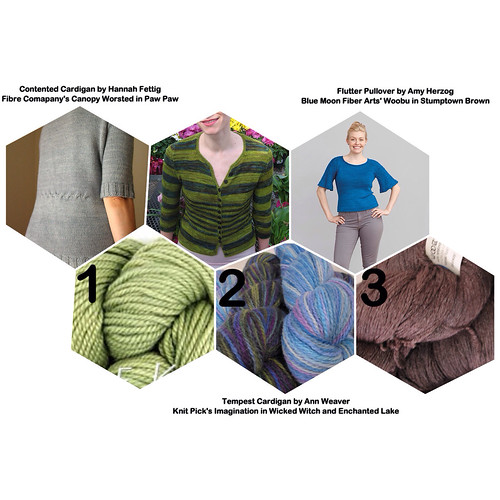 |
| pattern+yarn contenders 1 |
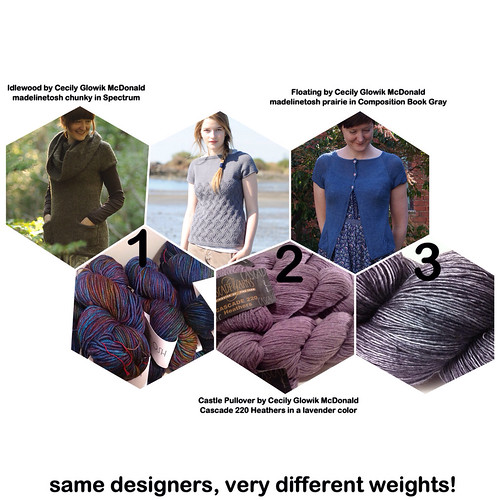 |
| patterns+yarn contenders 2 |
next up, in the house: I'm doing a lot of deep cleaning. There are several closets that need a complete overhaul and several trips to goodwill. I need to determine what to do with the handknits that are too large for me. And I need to put a bunch of my stash up on ravelry as available to destash. I hope to "renovate" a drawer area to utilize for spices to free up another area of my countertop for useful tasks.
next up, in life: my anniversary is coming up soon :) Further out, I need to determine what the holiday season will look like and begin planning. My business will flourish, in the future. And I will keep working on my health very closely.

 Posted with Blogsy